

User experience
In our BasicPay application, the user will navigate to the Payments page where can either select a user from their contacts or input the public key of a destination address with a specified asset they’d like to send along with the amount of the asset.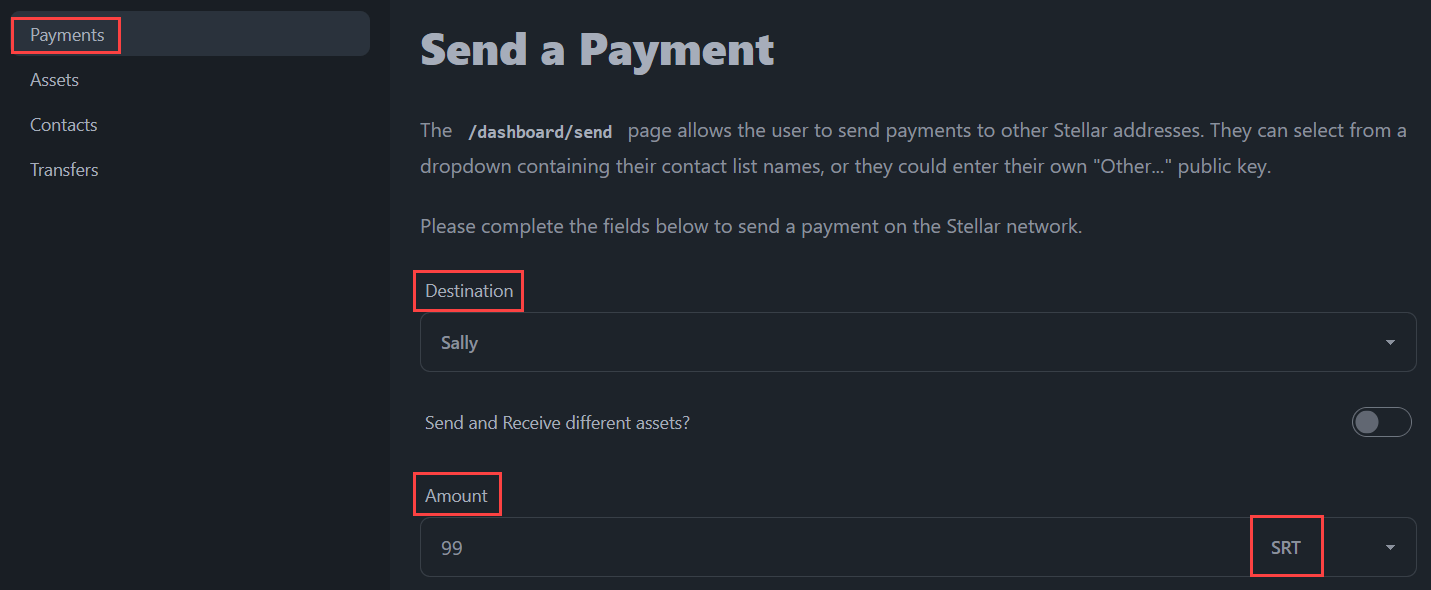
Code implementation
The /dashboard/send page
The /dashboard/send page allows the user to send payments to other Stellar addresses. They can select from a dropdown containing their contact list names, or they can enter their own “Other…” public key.
The following additional features have been implemented:
- If the destination address is not a funded account, the user is informed they will be using a
createAccountoperation, and must send at least 1 XLM to fund the account. - The user can select to send/receive different assets and paths are queried from Horizon depending on the four below points:
- If they want to strict send or strict receive,
- The source/destination assets they have selected,
- The source/destination accounts, and
- The amount entered for the send/receive value.
- An optional memo field is available for text-only memos.
/src/routes/dashboard/send/+page.svelte
The transaction functions
In the above section, we used thecreatePaymentTransaction function. This function can be used to send a payment of any asset from one Stellar address to another.
We also used the createCreateAccountTransaction function. This is used when the destination account is not currently funded and active on the Stellar network. The only asset possible in this scenario is native XLM.
/src/lib/stellar/transactions.js