

Table of Contents
- Soroban and Hardhat Comparison
- Hardhat vs Soroban SDKs
- Using Rust and Soroban for Smart Contract Development
- Vault Contract Deployment and Interaction
Soroban and Hardhat Comparison
Introduction
Soroban and Hardhat are both frameworks that enable developers to build, test, and deploy smart contracts. In this section, we will delve into the similarities and distinctions between these two frameworks.Soroban Framework
Soroban is a Rust-based framework tailored for developing smart contracts on the Stellar network. Designed as a lightweight framework, with tools to support developers, Soroban allows developers to develop smart contracts through a simple and intuitive workflow.Hardhat
Hardhat serves as a development environment for compiling, deploying, testing, and debugging smart contracts for the EVM. It assists developers in managing and automating recurring tasks inherent to building smart contracts.Similarities
Soroban and Hardhat are powerful frameworks designed to streamline the process of building, testing, and deploying smart contracts. Equipped with a comprehensive suite of tools, these frameworks facilitate the development of smart contracts and their deployment on their respective virtual machines.Differences
Soroban, with its lightweight design, offers developers an exceptional platform for writing Rust-based smart contracts and deploying them effortlessly on the Stellar network. In contrast, Hardhat serves primarily as a development environment tailored for the Ethereum Virtual Machine, providing a different focus and target audience.Hardhat vs. Soroban SDKs
Hardhat offers a streamlined workflow for deploying smart contracts on the Ethereum Virtual Machine, with key components such asethers.js, scripts, and testing playing crucial roles.
On the other hand, Soroban presents a compelling alternative, boasting powerful SDKs that facilitate smart contract development and deployment. In the upcoming section, we will delve into Soroban’s SDKs, drawing comparisons with Hardhat components, and highlighting the unique advantages each platform brings to the table.
Ethers.js
Ethers.js is a widely-used JavaScript library designed for seamless interaction with the EVM. It offers a user-friendly interface that simplifies connecting to Ethereum nodes, managing accounts, and sending transactions. Additionally, Ethers.js provides a robust API for efficient communication with smart contracts. This library is a core component of the Hardhat framework and can be imported into scripts to streamline the deployment of smart contracts.
Soroban Client
Soroban offers a comparable library,stellar-sdk, that enables seamless interaction smart contracts deployed on the Stellar Network. This library supplies a comprehensive networking layer API for Stellar RPC methods as well as the Horizon API (nearing end-of-life), simplifying the process of building and signing transactions. Additionally, stellar-sdk streamlines communication with RPC instances and supports submitting transactions or querying network state with ease.
Scripts
Hardhat scripts streamline the automation of routine tasks, such as deploying and managing smart contracts. Developers can create these scripts using either JavaScript or TypeScript, catering to their preferred programming style. They are stored in thescripts directory of a Hardhat project and can be executed using the npx hardhat run command.
Soroban Scripts
Soroban offers an extensive collection of SDKs that include scripting capabilities, ensuring a smooth workflow for deploying and managing smart contracts. Developers can automate tasks such as compiling, deploying, and interacting with smart contracts using a variety of SDKs that support scripting in languages likeJavaScript, TypeScript, Python, and others.
Testing
Hardhat provides a testing framework that allows developers to write tests for their smart contracts. These tests can be written in JavaScript or TypeScript and run using thenpx hardhat test command.
Soroban Testing
Soroban enables users to leverage the power of Rust’s testing framework to write tests for their smart contracts. These tests can be written in Rust and run using thecargo test command.
Developing Smart Contracts with Rust and Soroban
Introduction
Now that we’ve examined the deployment workflow with Hardhat, let’s explore developing and deploying smart contracts with Rust and Soroban. The key advantage of using Soroban is its ability to leverage Rust’s safety features and performance, making it an excellent choice for developing secure and efficient smart contracts. We’ve learned that Smart contracts are self-executing contracts that can be programmed to automatically enforce the rules and regulations of a particular agreement. They are a core component of decentralized applications (dApps) and blockchain technology. In this section, we will learn how to use Rust and Soroban to develop and deploy custom smart contract logic.Setup
If you haven’t already setup up the dev environment for Soroban, you can get started by following the steps on the Setup Page. This project requires using thesoroban_token_contract.wasm file which you will need to import manually.
First, you will need to clone the main branch of soroban-examples repository:
soroban-examples/token directory
soroban_token_contract.wasm file which you will need to import into your project. The soroban_token_contract.wasm file is located in the soroban-examples/target/wasm32v1-none/release directory.
Writing a Smart Contract
Let’s start by writing a simple example of a vault contract that allows users to deposit funds and withdraw their funds with generated yield. Here is a breakdown of the contract mechanics- Shares are minted when a user deposits.
- The DeFi protocol uses the users’ deposits to generate yield.
- User burns shares to withdraw their tokens + yield.
vault.
Now let’s add the soroban_token_contract.wasm file to the vault project. To do this, we can drag and drop the file into the vault project directory.
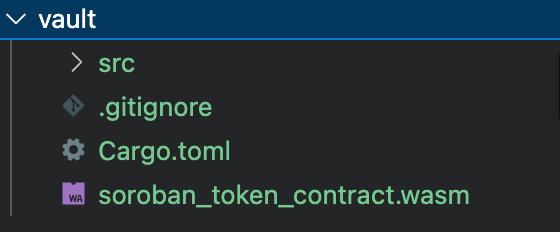
Cargo.toml file in your project and ensure that it matches the following:
src/lib.rs- This is where we will write our vault smart contract logic.src/test.rs- This is where we will write our tests.src/token.rs- This is file inherits the token contact that we imported earlier. It’s also where we will write our token creation logic.
token_interface.rs tab. The token sets its admin and metadata in a __constructor function, which the host runs as part of the deployment itself, and exposes a mint function that we will use to mint tokens for our vault contract. Because the constructor runs at deployment, there is no separate initialization call to make — or to front-run. If you want to see the full code of the token contract, you can check it out here.
- src/lib.rs
- src/test.rs
- src/token.rs
- src/token_interface.rs
lib.rs file above and discover how “yield” is generated from our vault contract
First, let’s take a look at what happens when a user deposits tokens into the vault contract.
- The
depositfunction is called by the depositor to deposit tokens into the vault contract. - The
transfermethod of thetoken_clientinstance transfers tokens from the depositor to the vault contract. - The current token balance and total shares issued by the vault contract are obtained using the
get_token_balanceandget_total_sharesfunctions, respectively. mint_sharesis called to issue new shares to the depositor and updates the total shares issued by the vault contract.put_reservestores the current token balance in a reserved location.
deposit method with 100 tokens, the following would happen:
- 100 tokens would be transferred from the depositor to the vault contract.
- The current token balance would be stored in a reserved location.
- The total shares issued by the vault contract would be updated to 100.
- 100 shares would be issued to the depositor.
- The
withdrawfunction is called by the withdrawer to withdraw tokens from the vault contract. - The
transfermethod of theshare_token_clientinstance transfers shares from the withdrawer to the vault contract. - The
transfer_tokenmethod of thetoken_clientinstance transfers tokens from the vault contract to the withdrawer. burn_sharesis called to burn the shares that were transferred to the vault contract.put_reservestores the current token balance in a reserved location.- Returns the total amount of tokens withdrawn by the user.
Note : In the withdrawal function, you’ll notice that the transfer amount is defined as &(&amount + (&amount / &100)). This is a simple yield calculation that assumes the yield to be 1% of the amount being withdrawn. However, it’s important to note that this is a very simplistic approach and may not be suitable for production-grade systems. In reality, yield calculations are more complex and involve various factors such as market conditions, risk management, and fees.
If the user were to call the withdraw method with 100 shares, the following would happen:
- 100 shares would be transferred from the withdrawer to the vault contract.
- The current token balance would be stored in a reserved location.
- 100 shares would be burned.
- 100 + (100/100) tokens would be transferred from the vault contract to the withdrawer.
Testing
To test the vault contract, we will can simply run the following command in our terminal from our vault contract directory:src/test.rs file.
Vault Contract Deployment and Interaction
Now that we have a working vault contract, we can deploy it to a network and interact with it. This section requires you to have a funded Keypair to use with Stellar’s Testnet. You can create and fund one using the Stellar Lab. Below you will find a series of commands that will help you build, deploy and interact with the vault and token contracts. You can use them to follow along as we walk through the process of building, deploying, and interacting with the contracts. It may behoove you to keep these commands in ascripts directory in your project. This way, you can easily run them from your terminal.
Note : If you decide to use scripts, be sure to double-check your import paths.
- build.sh
- deploy_token.sh
- mint.sh
- balance.sh
- upload.sh
- deploy_vault.sh
- deposit.sh
- get_rsrv.sh
- withdraw.sh
build.sh script from our vault directory.
deploy_token.sh script. The arguments after the -- are the token’s constructor arguments, so this single command both deploys the token and sets its admin and metadata.
upload.sh script.
deploy_vault.sh script, passing the token Wasm hash and the token contract address after the -- as the constructor arguments.
mint.sh script.
balance.sh script.
deposit.sh script.
reserves.sh script.
withdraw.sh script.
balance.sh script.
We should see our balance has increased the amount we withdrew plus yield (amount/100) or %1 of our withdraw amount.
get_rsrv.sh script.
We should see the reserves of the vault have decreased by the amount we withdrew + yield.